Which campaigns should change together?
Binom Rotations and Voluum Flows both let a buyer reuse routing settings across campaigns. Changing a shared configuration can change every campaign attached to it. The practical difference to inspect is how the campaign selects shared versus individual routing. Neither name describes the page a visitor reads.
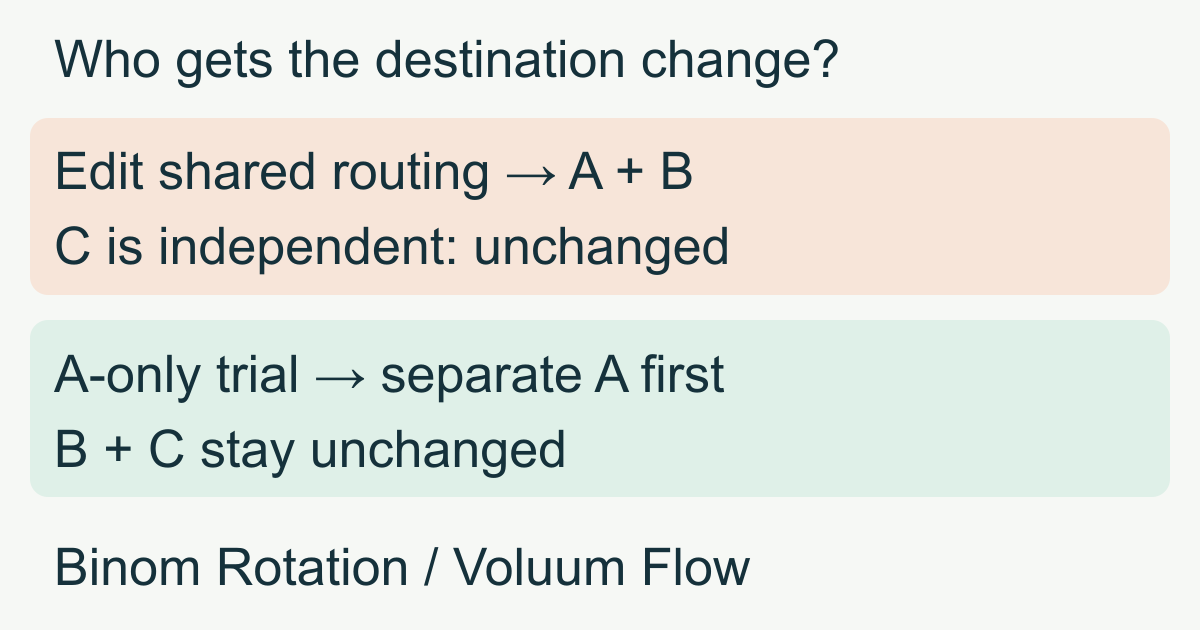
Suppose one buyer promotes an online course through three campaigns. A and B share the same page and signup offer through a common routing setup. C has independent routing. The buyer wants to test a new signup destination in A while keeping B and C steady. Editing the shared setup is the wrong scope for that trial.
A lander is the introductory page after the ad. An offer is the promoted service and its destination, here the course signup page. A path describes how a visitor reaches those pages. A Binom Rotation or Voluum Flow is a reusable routing configuration, not another visitor-facing page.
The team supplies the published course pages in this case; the tracker supplies routing and reports, while the destination reports completed signups.
Binom: attach campaigns to a Rotation
Binom v2's Rotation guide describes a template for campaign paths and rules. The buyer can create it under Rotations, add campaigns, or select it in the campaign's routing selector instead of Custom. Once saved, attached campaigns use that Rotation's settings. The earlier official Rotation guide explicitly describes changes applying to all campaigns using the Rotation.
For A and B, one shared Rotation is useful when both should receive the same offer replacement. Before changing it, list the attached campaigns. For an A-only trial, give A a separate Rotation or explicitly configure its own Custom routing, then verify the association after saving. Do not assume that opening the editor from A makes a shared object private. Check the behavior of the installed version; the older guide's automatic switch to Custom after an edit is not a guarantee for every version.
Within the selected routing, Binom's traffic distribution evaluates rules and allocates matching traffic to paths by weight. Sharing a Rotation and splitting traffic within a path setup are separate choices. The former controls where an edit applies; the latter controls where an eligible click goes.
Voluum: select a shared Flow or campaign-only Paths
Voluum's campaign Destination tab offers Flow and Path. A Flow is a saved path setup; the campaign destination guide warns that changing it affects all campaigns using it. The same guide distinguishes paths configured for that campaign only.
For A and B, the buyer selects the same Flow when both should follow centrally maintained destinations. For the A-only trial, configure A with campaign-only Paths or a separately maintained Flow, then verify B still points to the original Flow. Do not leave A attached to the original and edit that original expecting only A to change.
A Flow can contain default and rule-based paths. The Flow creation guide also distinguishes its country label from actual traffic targeting: the label limits which elements appear for selection; it does not itself target visitors by country. If the trial should reach one country, verify a routing rule rather than relying on the label. Validate the selected tracking method before depending on routing capabilities.
Who supplies the page, and what becomes visible?
In this example, the buyer's team supplies and hosts the course introduction and signup websites. Binom can connect a regular external lander and also offers integrated landers. Voluum's documented Lander setup connects an externally hosted page that is already available. A shared routing object does not supply the page's design or publish a revised signup form. Binom landers · Voluum Lander setup
| Buyer's task | Binom | Voluum |
|---|---|---|
| Reuse routing across A and B | Attach both to the same Rotation | Select the same Flow for both |
| Test A independently | Separate Rotation or verified Custom setup | Separate Flow or campaign-only Paths |
| Supply the actual pages | Team supplies external pages in this case; integrated landers are another option | Team supplies the external pages in the documented Lander setup |
| Compare signup results | Connect destination conversion reporting and inspect campaign/path results | Connect destination conversion reporting and inspect campaign/path results |
Neither a visit nor an onward click proves a completed signup. A postback is a server report of a result. Binom and Voluum both document returning the originating click identity with a conversion. Confirm that the new destination preserves that identity and reports the same signup definition before comparing it with the old one. Missing reporting means the outcome is unavailable, not zero. Binom postbacks · Voluum conversion postbacks
Apply the change to the intended campaign
Here is the buyer's hypothetical operating sequence:
- Record that A and B use the shared setup and C uses its own. Record the current page and offer references. If both A and B should change, edit the shared object and verify both campaigns afterward.
- For an A-only trial, first move A to independently maintained routing. Change its destination reference, leaving B on the original shared configuration. Save and reopen A and B to verify their associations.
- Check page references too. Two independent routing objects can still reference the same lander or offer. Editing that shared page or offer may affect both; separate routing alone does not copy website files or every referenced element.
- Use an authorized test visit to each campaign. Verify the intended destination and a completed signup report against the correct campaign. Keep the old routing available until the new path is verified.
Suppose A then records 30 signups from 1,000 eligible visits and B records 40 from 1,000, each visit having seven days to convert. These are teaching counts. Check the common signup definition, reporting coverage, source/audience differences and adequate sample before changing allocation. A and B may have different traffic, so this is not automatically a randomized test or proof that the new destination caused the difference. Read campaign/path results; a shared object's combined total cannot explain which campaign changed.
If A has onward clicks but no verified signups, inspect its new destination and postback first. If the same fault appears in both A and B after a shared edit, inspect their common routing and referenced elements. If mature, comparable results support a destination, update the intended routing or its weights. This is the information the buyer needs to decide what to adjust.
Choose by the operating task
Both products support centrally maintained routing; that overlap is useful. Trial Binom's Rotation assignment and Custom workflow if those are the objects your team will maintain. Trial Voluum's Flow versus campaign-only Path workflow if those are the controls you will use. Test the actual configuration, version and account rather than inferring accuracy, price or exclusive features from the names.
For a test within one campaign, use the landing-page A/B guide. For the broader page-and-tracker decision, see the MeetROAS/Binom and MeetROAS/Voluum comparisons. If the job is first to create a hosted install page for a home-screen web app, MeetROAS campaign pages address that separate need. That does not establish an automatic integration with either shared-routing system.
Sources
- Binom v2: Rotations — Checked: 2026-11-13
- Binom: Earlier Rotation behavior — Checked: 2026-11-13
- Binom v2: Traffic distribution — Checked: 2026-11-13
- Voluum: Campaign destination Flow and Path — Checked: 2026-11-13
- Voluum: Creating a Flow — Checked: 2026-11-13
- Binom v2: Adding landers — Checked: 2026-11-13
- Voluum: Add a Lander Element — Checked: 2026-11-13
- Binom: Postbacks — Checked: 2026-11-13
- Voluum: Conversion postbacks — Checked: 2026-11-13
- MeetROAS: Campaign pages — Checked: 2026-11-13