What is the same media buyer trying to do?
A media buyer runs mobile ads for an online puzzle membership site. The buyer wants to test two routes with the same ad. Route A opens the signup page directly. Route B asks visitors to install the site on their home screen, then open it and proceed to the same signup page.
Binom can split traffic across the routes and connect the buyer's own page and reported events to the original click. MeetROAS can supply the hosted install page for B and track install evidence and first opens in an eligible campaign test. In either setup, the membership site reports completed signups. Binom traffic distribution · MeetROAS product workflow
A lander is the introductory landing page a visitor sees after the ad. Here it is the install page in B. The offer is what the buyer promotes and where visitors go for it: membership and its signup URL in this example. A PWA is a website that visitors can add to their home screen and reopen from an icon on supported devices and browsers. PWA installation guide
Who creates and serves the page?
With Binom v2, the buyer prepares the introductory page. For a regular lander, the buyer registers its URL in Binom and serves it on a web host of their choice. For an integrated lander, the buyer uploads their HTML or PHP index page or a ZIP. The tracker can serve that page when the campaign link opens, saving the extra redirect to another landing URL. The tracker can run on a self-hosted installation or Binom Cloud. To preserve an existing custom PWA in this example, the buyer serves B on their own website and keeps its tested installation and launch flow. Regular landers · Integrated landers · Binom hosting options
With MeetROAS, the buyer adds copy, artwork and the membership destination to a hosted layout. MeetROAS supplies B's install entry. A uses the membership site's signup page directly. Both routes use the site's signup service, so the team still supplies the working URL, form and signup event. MeetROAS product workflow · Destination events
How does the buyer split the same ad traffic?
In Binom, point the ad to one campaign with two equally weighted paths. Set A to Direct so it goes to the offer. Send B through the custom PWA page. Normal rotation allocates clicks randomly by weight. The buyer can also use a rule to select eligible traffic, such as a device group, then compare two paths within that rule. Equal weights set the allocation target. Actual counts can differ. Binom v2 traffic distribution · Binom v2 rules
In MeetROAS, use a non-primary campaign eligible for a full journey test and start a 50/50 A/B test. Set A to go directly to the destination and B to show an install-capable layout. Keep the signup destination the same and select completed registration as the main comparison event. This tests the overall effect of adding the install journey. To test button copy next, keep the B journey fixed and change only the copy. A/B testing guide
Which steps can the buyer observe?
| Observation | Binom v2 | MeetROAS |
|---|---|---|
| Entry and handoff | Campaign clicks by allocated path. B can record clicks from the lander to the offer through a configured Click URL. | The A/B report shows assigned entries per variant. Use Campaign Performance for page views and install taps. Use destination arrival data to confirm that A loads the signup page. |
| PWA install on B | The team detects the signal on its custom PWA and sends a custom event with the original click ID. It can report first open separately if it retains the link to that click. | The hosted install flow records install CTA taps, installation evidence and first opens. A browser completion signal or a first open can supply install evidence. |
| Completed signup | The membership site sends a postback, a server report with the original click ID, to tie signup to its path. | The membership site sends an attributable signed signup event. The current A/B report can show outcomes for each variant. |
Binom's custom events accept numeric values. Define install tap, browser-reported completion and first launch from the installed entry separately, then handle duplicate reports. If the app loses the click ID on launch, the event cannot be used to compare the original paths. A regular lander link provides the route into the page. Actual page load or installation requires an observation of that step. Binom custom events · Binom conversion postbacks
MeetROAS records install taps as browser events. This A/B example uses the per-variant install and first-open counts. MeetROAS can use a first open as install evidence, so one observed open can contribute to both totals. Read them as separate measures and verify signal coverage on the phones and browsers in the campaign. MeetROAS event reference · Browser install completion event
What would the buyer change after seeing the data?
Suppose each route gets 1,000 eligible entries from the same traffic batch. Signup reporting is working and each entry has a full seven days to produce a signup. A records 40 signups and B records 30. B also records evidence for 150 installations and 100 first opens. These counts are hypothetical.
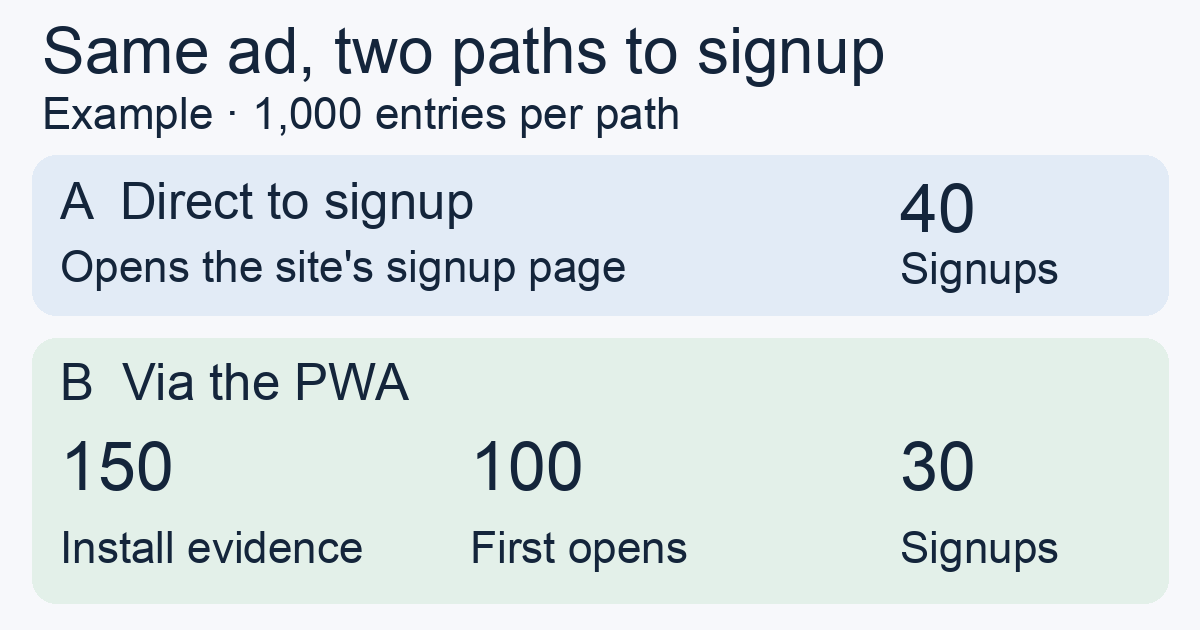
- Start with the common outcome. A has 40 signups per 1,000 entries and B has 30. The install column is “not applicable” for A because there is no install step. If the custom install event for B has yet to be connected, its column is “not measured.” Neither is a count of zero installations.
- Use Binom to decide what to change in the paths. If few visitors on B click through to the offer, verify that the handoff after PWA launch is also tracked. Then check the message or try a revised custom page. If enough data supports the signup difference and short-term signup is still the goal, raise A's path weight. Before changing traffic by device or ad placement, check that outcome reporting is complete for that segment.
- Use MeetROAS to decide which install step to test next. The gap between installation evidence and first opens is a reason to walk through the launch instructions and destination on a real phone. After checking signal coverage, test new instructions or a new layout for B. If later signup data supports A, apply the direct variant. If return visits after seven days are the goal, measure returns or logins for both routes before choosing one.
Before changing traffic, use an identifiable test click for each route and verify that signup joins to the right path. Then compare the same observation window. Within each tool, use the same entry definition for both denominators. Align entry, deduplication and event definitions before comparing across tools. How click IDs work · How to compare direct and landing-page routes
Which one should the buyer try first?
If the buyer wants to keep an existing custom page and event definitions while managing rules, paths and weights, try the Binom setup. If the team needs a hosted install page and wants to compare the direct and install journeys within one campaign, try the MeetROAS layout and A/B workflow. In both trials, verify a real signup and check that the report covers the step the team plans to change.
If you are shortlisting either tool, use the ad tracker acceptance checklist to test one signup, one retry and a closed day of spend before committing.
Sources
- Binom v2: Adding landers — Checked: 2026-11-07
- Binom v2: Integrated landers — Checked: 2026-11-08
- Binom: Self-hosted and cloud options — Checked: 2026-11-07
- Binom v2: Traffic distribution — Checked: 2026-11-08
- Binom v2: Campaign rules — Checked: 2026-11-07
- Binom v2: Events — Checked: 2026-11-08
- Binom: Conversion postbacks — Checked: 2026-11-08
- MeetROAS: Campaign pages and journeys — Checked: 2026-11-08
- MeetROAS: Source parameters and events — Checked: 2026-11-08
- MeetROAS: Destination events — Checked: 2026-11-08
- MDN: Installing and uninstalling web apps — Checked: 2026-11-07
- MDN: Browser install completion event — Checked: 2026-11-07