Start with the signal you are missing
An ecommerce media buyer sees fewer purchases in an ad report than in the order system and wonders what a server feed would recover. First separate two questions. To see where shoppers leave checkout, observe their actions in the browser. To know which orders were paid, use the system that records payment. Establish where each event originates before choosing how to deliver it.
A pixel here means a browser tag on a page, such as a tag reporting that checkout opened. A server business event comes from the backend when it confirms an outcome, such as an order changing from awaiting payment to paid. Both can report a purchase. Agree whether purchase means successful payment, order submission, or another state. A shared definition helps separate gaps in observation from differences in business results. Google Tag Manager tagging configurations · Click IDs and UTMs
Separate where events originate from how they travel
- Browser pixel. The visitor’s browser observes checkout or the confirmation page and sends the event. You can see those page actions when the page loads, the tag runs, delivery succeeds, and measurement is permitted.
- Browser event via a server container. The page still observes the action. The container can control which fields and destinations receive it. If the page sends no event, the container has no signal to forward.
- Server business event. The merchant’s order or payment system can confirm payment even when the shopper never returns. For an order audit, check for missed payment notifications, failed delivery, and missing order IDs.
For example, a Google Tag Manager server container can process and forward a signal from a web container. That signal still originates in the browser. GA4 Measurement Protocol can also receive backend or offline events, and Google describes it as a supplement to automatic collection. If the outcome is payment, first establish that the system responsible for payment can supply it. Then choose a delivery path. Google Tag Manager server-side tagging · GA4 Measurement Protocol
Measure the gap on the same paid-order cohort
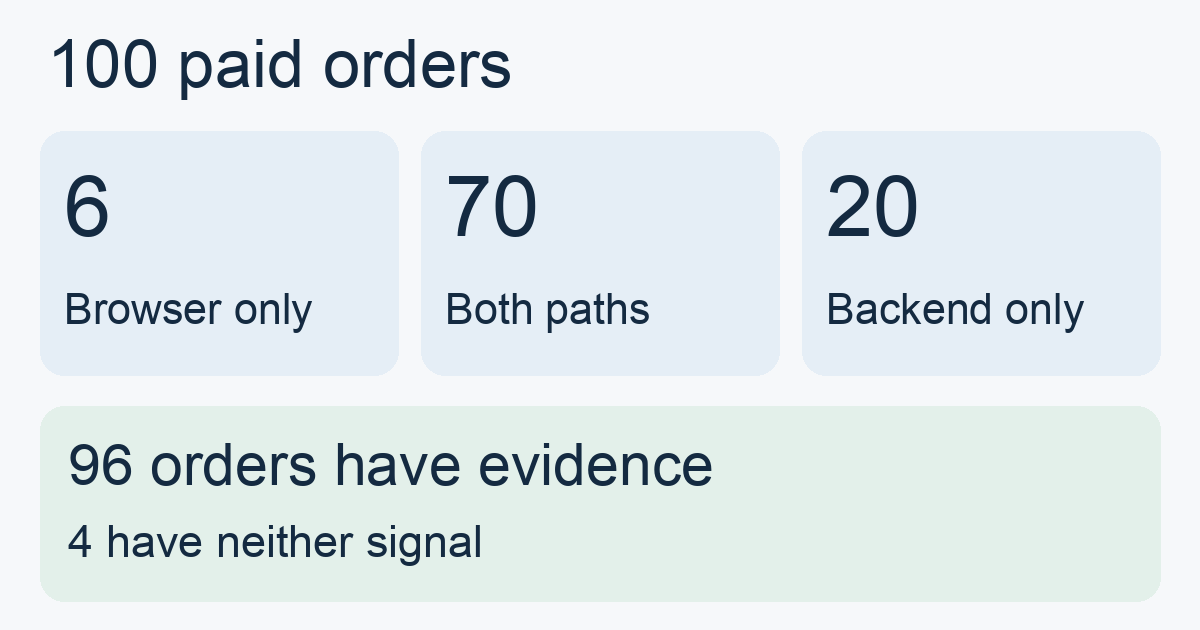
Suppose a merchant takes 100 paid orders from one week that are eligible for this ad measurement. At an agreed reconciliation cutoff, count only distinct orders whose events match one of those 100 by a stable order identifier. The pixel covers 76, the backend covers 90, and 70 are in both sets. These are hypothetical counts of matched orders.
- Orders with evidence on either path = 76 + 90 − 70 = 96. Observed coverage is 96 ÷ 100 = 96%.
- The backend alone covers 20, the browser alone covers six, and four have no evidence in either set. Check whether the confirmation page failed to load for some of the 20. For the six, look for a missing server event or missing matching value. Test each explanation against the order.
- Verify ad attribution separately. Matching 96 orders establishes evidence in this reconciliation. Whether the ad platform links a purchase to an eligible interaction and includes it in a report still depends on the identifiers, processing status, and attribution settings.
When both paths send one purchase to the same destination, follow that destination's deduplication rules. Align the event definition, destination and shared identifier before comparing results. If all you have are two totals, the overlap is unknown. Record combined coverage as unknown until you can check it. Diagnose duplicate conversion events
Check receipt, matching and reporting separately
Keep three columns in your audit. Record whether the source generated the event, whether the destination received it, and whether it matched the right order and appeared in the intended report. For example, a successful HTTP response from GA4 Measurement Protocol confirms receipt of a request. A malformed or unprocessed event can still be absent from reports. Use validation to check test data and look for report evidence separately. Events sent to the validation server do not appear in reports. GA4 response behavior · GA4 event validation
Set both paths according to your team's approved purposes, consent state and allowed fields. Distinguish an event that is ineligible for ad measurement from a delivery failure. After changing the delivery path, verify which permitted fields the destination receives. Start with isolated test data without personal information, and keep test conversions out of live reporting. Google server-side consent mode
Run a payment test before deciding which path to keep
- Fix the scope first. Choose one paid status, one destination and a closed order period. Use the order system as the baseline and agree how long to wait before reading the report.
- Verify two normal journeys. In isolation, complete one payment that returns to the confirmation page and one that does not. For each, check payment status, event generation and receipt, then look for the expected report entry.
- Test a retry. When both paths report one purchase, check that it counts once and that a second distinct eligible order still counts. If payment evidence is missing, look at the backend. If checkout interactions are missing, look at browser measurement. If ad attribution is missing, check whether a permitted identifier reached the right record.
Teams using MeetROAS can use its destination event test to send a signed business event with its corresponding click ID and verify attribution and retry handling in Test Runs. The fixed account test ends at the MeetROAS test result. Verify receipt by the live ad platform separately.
Sources
- Google Tag Manager: Client-side versus server-side tagging — Checked: 2026-11-10
- Google Tag Manager: Server-side tagging — Checked: 2026-11-10
- Google Analytics: Measurement Protocol — Checked: 2026-11-10
- Google Analytics: Measurement Protocol reference — Checked: 2026-11-10
- Google Analytics: Validate events — Checked: 2026-11-10
- Google Tag Manager: Consent mode with server-side tagging — Checked: 2026-11-10
- MeetROAS: Partner Event API and Test Runs — Checked: 2026-11-10