Primary and secondary conversions answer different questions
In Google Ads, a primary conversion action can guide bidding when its standard goal is selected by the campaign. A secondary action normally stays available for observation in “All conversions.” There is an important exception: actions inside a custom goal used by the campaign participate in reporting and bidding even if labeled secondary. Check the campaign's goals as well as the label.
Suppose your store wants paid orders, but also measures completed registrations. You can observe registrations without asking a conversion-based bidding strategy to pursue them as equivalent outcomes. The practical question is not “Which event gets the impressive label?” It is “What outcome is this campaign actually trying to acquire?”
This guide covers supported website registration and purchase actions in a Google Ads campaign using conversion-based Smart Bidding. Some action types have different restrictions. It does not claim that every campaign type or every item in “All conversions” can be used for bidding. Google's primary and secondary action documentation defines the labels and their exception.
Read the action, goal and campaign together
A conversion action is a measured outcome, such as a completed registration or purchase. A standard goal groups actions by their purpose, such as purchases. The campaign's selected goals determine which goals it optimizes toward; they may follow account defaults or campaign-specific settings.
For a standard goal, read two settings together: the action is primary, and its goal is used by that campaign. Primary status alone does not establish that an action belongs to every campaign's selected optimization goal. Google also notes that primary actions outside a campaign's optimization may still inform predictions; this is not a promise that those actions are counted in that campaign's selected “Conversions” total.
The ordinary secondary label means observation rather than a selected bidding outcome. However, a campaign-specific custom goal is an explicit bundle of actions. Google's campaign-specific goal guidance says included actions are used for reporting and bidding regardless of their primary or secondary labels. A secondary registration inside an active custom goal can therefore still be a bidding outcome. Inspect that membership before assuming it is excluded.
Worked example: 10 orders or 50 mixed actions?
This is a hypothetical teaching example, not customer performance or a forecast. One acquisition cohort costs USD 500. After allowing its agreed window and reporting to complete, 40 people have each registered once. Ten of those people each complete one paid order. Assume both action feeds are valid, all 50 actions are attributed to this cohort, and there are no other actions, modeled additions, view-through conversions or fractional credits in this example.
Compare two possible goal configurations for those same outcomes; this is not a claim that editing settings rewrites historical reports. “Purchase only” selects the standard purchase goal, with purchase primary and registration secondary. “Both goals” selects both standard goals, with both actions primary.
| Configuration | Conversions | All conversions |
|---|---|---|
| Purchase only | 10 | 50 |
| Both goals | 50 | 50 |
A selected custom goal containing both actions would also include both in reporting and bidding, even if registration remained secondary. That exception changes what the strategy is asked to pursue; it does not create another purchase.
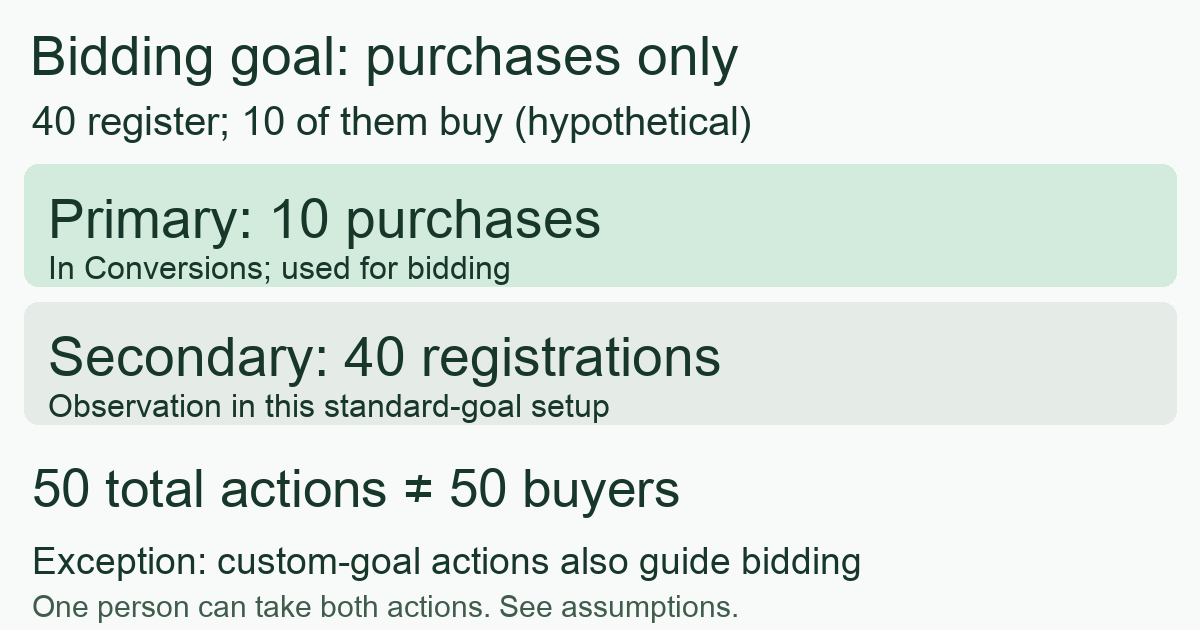
In the purchase-only configuration, purchase CPA = USD 500 / 10 = USD 50 per purchase. Dividing USD 500 by all 50 actions gives USD 10 per mixed action. It does not give a USD 10 purchase CPA. The CPA denominator guide explains why naming the completed action matters.
There are ten buyers in this example, not fifty. A buyer's registration and purchase are two different valid actions. They are not automatically a duplicate delivery of one event. Conversely, sending the same purchase twice is not justified because it has two identifiers. Reconcile the underlying orders before interpreting either total.
What the two reporting columns can tell you
“Conversions” reflects the actions included under the campaign's applicable goal setup. Google describes “All conversions” as a broader measure that includes “Conversions” and other eligible actions. It is not a second, disjoint bucket: adding the two columns double counts the included actions.
Segment the report by conversion action. In this example, that exposes 40 registrations and 10 purchases instead of one unexplained 50. In an actual account, inspect other sources and credits too; do not expect every “All conversions” total to equal just these two action counts. Nor is either column a unique-customer ledger or proof that advertising caused the outcomes.
The One or Every counting setting answers a separate question: how many occurrences of a particular action to count after an interaction. It does not merge registration and purchase into one customer. Keep the action's counting rule separate from its bidding eligibility, and keep missing tracking distinct from confirmed zero outcomes.
A five-step audit before changing optimization
- Name the business outcome. Write “valid paid purchase” or “qualified lead,” with a verifiable completion rule. A button click is not a completed registration. Lead generation may legitimately optimize toward a qualified lead; purchases are not the universal goal.
- Inspect each action. In Google Ads, go to Goals, Conversions, Summary. Review its optimization label, completion condition and counting rule. Record the current settings before editing.
- Open the campaign's goals. Check account defaults versus campaign-specific goals. Review selected standard goals and every action inside an active custom goal. Do not infer bidding eligibility from a label on the summary screen alone.
- Reconcile the report. Segment by action, align spend, date basis and attribution scope, and compare completed outcomes against destination records. Use mature observations; conversion delay can make a recent result incomplete.
- Make one deliberate change and schedule review. If the business objective is purchases but the campaign is pursuing easy registrations, choose a consistent goal configuration and document when it takes effect. Recheck data delivery, allow for bidding adaptation and review against a predefined spend cap and observation window. Changing the goal, creative and budget together makes the explanation harder.
Low purchase volume alone does not prove that a plentiful proxy is valuable. Before using registrations as an optimization outcome, check whether they lead to qualified customers. The registration-to-paying-customer comparison shows how source mix can distort that judgment. There is no universal count threshold here that makes an unsuitable event a good business goal.
Keep measurement separate from the bidding configuration
MeetROAS can help observe installation, first open and connected downstream stages when investigating where visitors stop progressing. Its event definitions distinguish registration from first deposit; downstream observations need valid delivery and linkage, and a deposit is not automatically a merchant purchase or profit. Google Ads goal selection still needs to be checked in Google Ads itself; this does not imply automatic goal configuration or event mapping.
A useful review note contains the campaign, selected goals, action names and labels, custom-goal membership, counting rules, spend scope and next observation date. If a total improves, ask which completed business outcome increased before concluding that the campaign improved.
Sources
- Google Ads: About primary and secondary conversion actions — Checked: 2026-10-25
- Google Ads: About All conversions — Checked: 2026-10-25
- Google Ads: About campaign-specific conversion goals — Checked: 2026-10-25
- Google Ads: About conversion counting options — Checked: 2026-10-25
- MeetROAS: Partner Event API reference — Checked: 2026-10-25