Choose an observation policy before looking for a flattering ROAS
An attribution window sets how long after an eligible ad interaction a conversion can qualify for credit. It is not the “last seven days” selected in a reporting calendar. Changing the window changes eligibility, not the payments that happened. Choose it using the outcome, buying cycle, available evidence, and platform support, then keep comparisons consistent.
A marketer's practical question is how long customers take to register or pay after an interaction. If installation happens quickly but payment takes a week, one short window can lead you to stop traffic before its downstream value appears. Continually extending a window to improve reported ROAS does not establish better advertising either.
Separate two concepts: the window defines time eligibility; the model allocates credit among eligible interactions. See the one-order attribution example for credit rules. This guide focuses on selecting, recording, and comparing the time policy.
Why can one mature cohort produce 1x, 2x, and 3x?
Everything below is hypothetical, not customer results. A day-0 cohort of 100 ad clicks costs USD 100. Three different customers each pay USD 100, respectively two, five, and nine days after their own click. All times use UTC. There are no other touchpoints, and one consistent last-click rule counts click-through purchases only. Refunds, tax, and shipping are excluded.
Assume an independent order record can link these purchases to the clicks, all 14 observation days have elapsed, and delivery is complete. Filtering the same known orders through three illustrative windows gives:
| Click-through window | Eligible purchase days | Attributed amount | Amount / USD 100 spend |
|---|---|---|---|
| 3 days | Day 2 | USD 100 | 1x |
| 7 days | Days 2 and 5 | USD 200 | 2x |
| 14 days | Days 2, 5, and 9 | USD 300 | 3x |
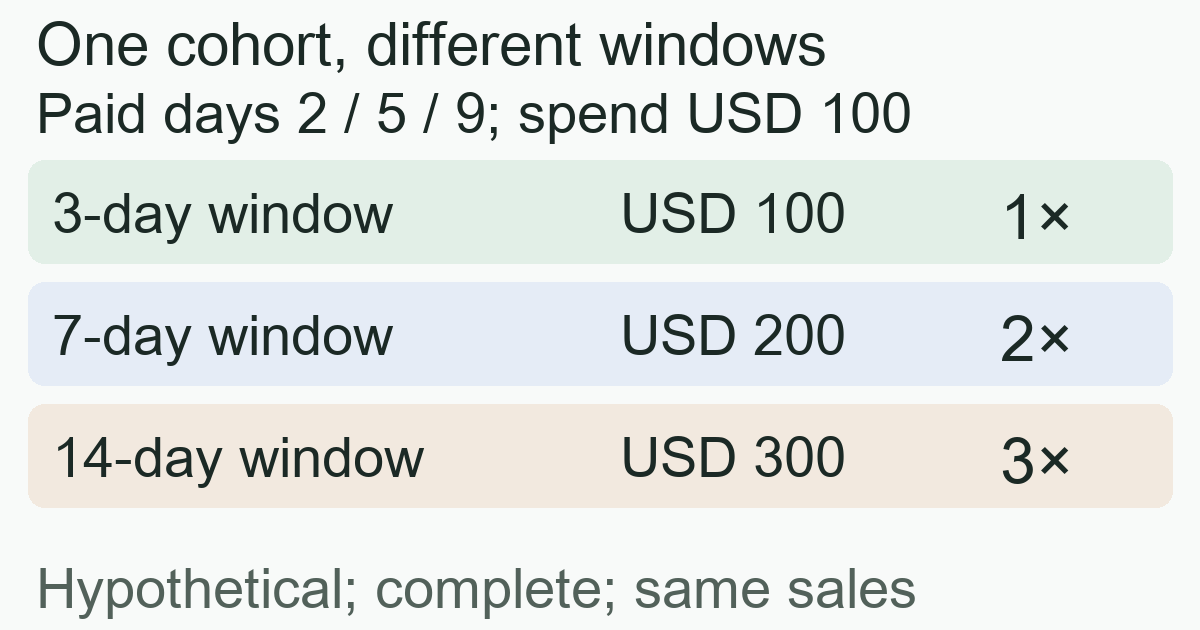
These are alternative views of one cohort, not three campaigns or amounts to add together. The day-9 purchase exists even when excluded by the shorter windows. Three, seven, and fourteen days illustrate filtering; they are not selectable options for every platform or event. For other requirements behind the ratio, see ROAS formulas and common mistakes.
Seven-day click and seven-day view are different measurements
Write down which interaction starts the clock before choosing its length. Click-through attribution starts with a click. View-through attribution uses the platform's eligible impression or viewing conditions and may require no click. Qualified video engagement can differ from an impression; do not treat everyone served an ad as one identical interaction category.
Google Ads' window documentation distinguishes click-through, engaged-view, and view-through settings. Check which reporting columns contain each category, whether exclusions apply, and whether multiple channels can claim one order. Matching “seven days” aligns duration alone, not interactions or deduplication scope.
To compare post-click payment quality across two sources, start with a click-based policy both support and that fits the buying cycle. Keep view-based results visible separately. View data can be useful; mixing them into one side of a click-only comparison makes the comparison misleading. A window choice also cannot replace an incrementality experiment or establish that advertising caused a purchase.
Choose candidates from complete data, not a truncated delay report
Define the outcome first: registration, first payment, and every purchase are different events. Reconcile deduplicated destination orders with source records you may legitimately retain, then examine elapsed time from eligible interaction to outcome. Mark device changes or missing source information as unlinked; do not assume those orders all occurred outside the window.
A short-window report may hide the late outcomes you need to evaluate. If tracking currently records only conversions within seven days, seeing every recorded purchase inside seven days does not prove the window covers the entire buying cycle. Google's window documentation warns that a seven-day setting also limits what its time-lag report can show. Consult compliant records with longer coverage or plan prospective observation instead of deriving a complete distribution from truncated data.
Avoid comparing yesterday's new traffic with last month's fully observed traffic. Google's conversion-lag explanation describes why incomplete outcomes can make CPA appear higher and ROAS lower. Its delay-report instructions require a sufficiently old reporting period. Record the cohort's final interaction time, observation cutoff, and delivery delay; allow the chosen window to elapse before evaluation. Keep forecasts separate from observed outcomes.
For an equal-age comparison, the conversion-delay checkpoint example keeps acquisition cost fixed and shows why an older cohort’s day-seven ROAS cannot be ranked against a new cohort’s day-one result.
Record three time settings; a longer setting does not restore all history
The first setting is the conversion recording window: how long after an interaction an outcome can be recorded. The second is the reporting date range and date basis: which days appear, and whether results belong to the click date or purchase date. A September 1 click followed by a September 6 payment is five days apart. The date basis can place the result on different calendar days without changing that five-day interval. Google Ads' conversion-time columns distinguish standard columns from conversion-time reporting.
The third setting is a lookback control inside some attribution reports. Google's attribution-report documentation explicitly distinguishes its Lookback window control from a conversion action's Conversion window. Increasing report lookback is not evidence that previously unrecorded orders will reappear.
Supported values also vary by source and event. The GA4 key-event lookback documentation lists different choices for first open/first visit and other events. Inspect the selected event rather than applying one platform's seven-day option universally.
If changing a window, retain the old setting, new setting, and effective time. Google Ads and GA4 describe forward-applying changes. Do not assume increasing the setting recalculates every earlier conversion excluded by the shorter policy. Label policy changes before interpreting before-and-after differences as traffic quality.
Publish a comparison policy everyone can follow
Use a small shared record so marketers, analysts, and destination-system owners compare the same thing:
- Outcome and amount: completed payment, each order once, USD, tax and shipping excluded; state refund handling separately.
- Interaction and window: click-through duration, whether views appear separately, the model, and channels eligible for credit.
- Time and completeness: interaction cohort, timezone, reporting date basis, and observation cutoff; identify pending delivery and unlinked sources.
- Change and review dates: when the policy changed and when mature outcomes will be reviewed; keep event, spend, and allocation rules consistent.
When the duration is unclear, propose candidates from the buying cycle, supported options, and complete historical evidence, then observe prospectively under a fixed policy. Do not change settings daily to follow reported performance. An insufficient-sample conclusion is useful when evidence cannot support a choice.
MeetROAS can help examine Campaign installation, first-open, and integrated downstream goals separately to locate funnel drop-off. Payment still requires destination-system delivery and valid linkage. These stages help frame how long to observe, but do not unify upstream attribution settings or infer missing revenue from installs. The event documentation describes integration requirements.
Sources
- Google Ads: About conversion windows — Checked: 2026-10-19
- Google Analytics: Change the key event lookback window — Checked: 2026-10-19
- Google Ads: About conversion lag reporting — Checked: 2026-10-19
- Google Ads: Find out how long it takes for customers to convert — Checked: 2026-10-19
- Google Ads: Understand conversion tracking data — Checked: 2026-10-19
- Google Ads: About attribution reports — Checked: 2026-10-19
- MeetROAS: Partner Event API reference — Checked: 2026-10-19