You see three paid orders in your store, but one purchase conversion in Google Ads. Before concluding that tracking failed, check the purchase action’s Count setting. One can deliberately count one occurrence after an ad click, even when that click led to several genuine orders. Every counts each eligible occurrence of that action. Neither setting tells you how many unique customers you acquired.
A conversion action is a defined outcome, such as a completed purchase or a submitted lead form. Set its counting policy according to the business question: usually each genuine sale matters; for a lead action, you may want to know whether a click produced at least one lead. This guide focuses on website actions after ad clicks. App-install counting and other conversion sources have their own restrictions.
One versus Every: what changes?
Google’s conversion counting guidance defines the setting separately for each action. One is not “one customer forever,” and it is not a single cap shared by every action in the account. A purchase action and a lead action can use different policies.
Start with the decision you need to make:
| Question | Start with | Limit |
|---|---|---|
| Paid orders? | Every | Not buyers or profit |
| Lead per click? | One | Not unique people |
| Same order resent? | Order IDs | One is no fix |
A lead-generation business may have a reason to measure every distinct, valuable inquiry. Define that value before choosing a policy; “lead” does not automatically make every repetition worthless. Equally, a sale should satisfy your completion rule before it is counted. A visit to checkout is not a paid order.
Worked example: three orders, one buyer
This is a hypothetical teaching example, not customer performance. One person clicks an ad once, then places three separate paid orders within the action’s seven-day click-through window. Each order has its own unique transaction ID. The first order’s confirmation page is reloaded, sending that same order ID again. Assume the duplicate is correctly removed, all three orders receive full credit from this click, reporting is mature, and there are no other interactions, modeled additions, view-through conversions or fractional credits.
| Policy | Orders | Count | Buyers |
|---|---|---|---|
| Every | 3 | 3 | 1 |
| One | 3 | 1 | 1 |
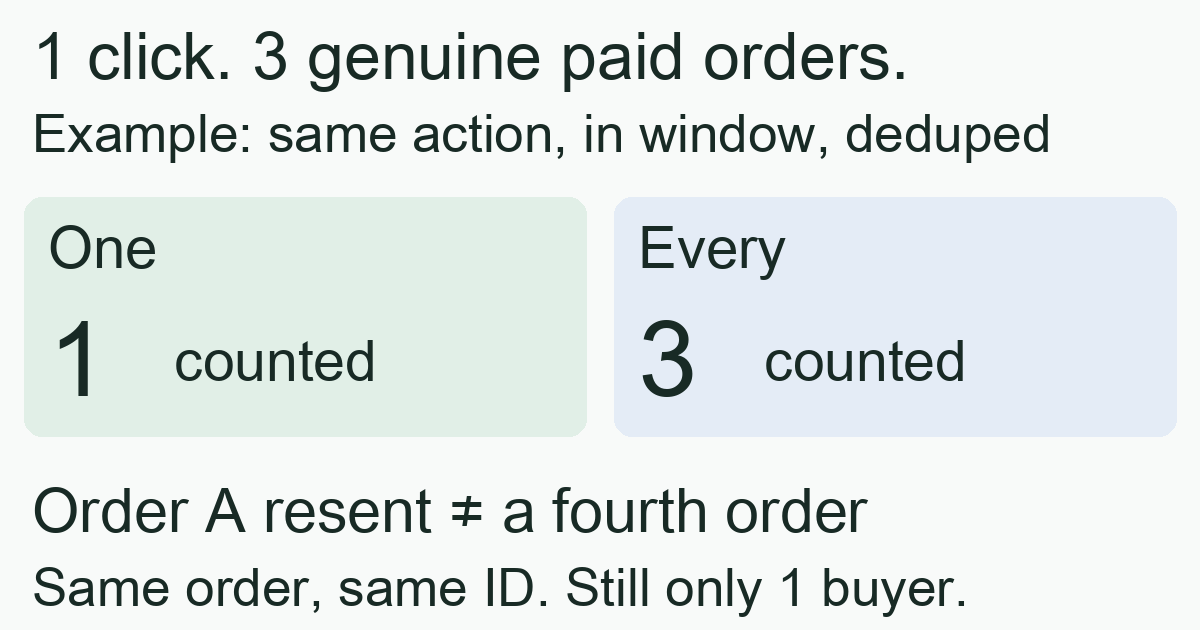
These are alternative configurations for the same hypothetical outcomes, not a claim that changing the setting will rewrite yesterday’s report. The store still fulfilled three orders in either case. If the ad spend for this deliberately small example is USD 90, the reported cost per counted purchase is USD 90 / 3 = USD 30 under Every, or USD 90 / 1 = USD 90 under One. The lower number does not demonstrate better acquisition: only the counting policy changed. Neither number alone establishes profit or a complete customer acquisition cost. The CPA guide explains why naming the denominator matters.
Now consider a separate lead action: the same click leads to two valid form submissions of the same type. Every would count two; One would count one. Do not add those submissions to purchases and call the result a buyer count. If the person later clicks another ad, One is not a lifetime identity rule that automatically merges everything they do.
A repeated purchase is different from a repeated tracking message
In the example, orders A, B and C are three business facts. Sending A again after a page reload is another delivery of the same fact. Google’s transaction ID guidance distinguishes this from Count: for the same conversion action, an already received transaction ID lets Google identify a duplicate.
Use a distinct ID for each order and preserve that ID when resending the same order. Reusing one fixed ID for unrelated orders can hide genuine sales. Conversely, assigning a fresh ID on every reload makes the messages look like different transactions. Confirm the implementation against real order records before trusting the total. This website-tag example is not a universal deduplication promise across sources; Google specifically excludes duplicate view-through conversions from this transaction-ID remedy.
Counting, bidding goals and windows answer different questions
Keep three decisions separate:
- Count: how many occurrences of this action to count after an eligible interaction.
- Goal configuration: which actions participate in the campaign’s reporting and bidding. The primary and secondary conversion guide explains selected standard goals and the custom-goal exception.
- Conversion window: how long after the interaction an outcome can remain eligible. The attribution-window guide explains why changing that boundary changes the population.
Every does not make an otherwise excluded action a bidding goal, and One cannot recover an event that was never received. A recent incomplete report also needs a conversion-delay check, rather than an immediate change to Count.
A practical audit before changing the setting
- Name the completed outcome. Write “paid order” or “valid inquiry,” including what excludes a failed or incomplete attempt. Decide whether another occurrence represents additional business value.
- Record the current configuration. Open Google Ads → Goals → Conversions → Summary, select the action, and inspect Edit settings → Count. Also record the action’s source, selected campaign goals and window. Do not assume account defaults are right for this action.
- Trace a small known case. Compare separate completed orders with their tracking deliveries. Separate genuine repetition from reloads or retries before comparing totals.
- Choose and document the policy. Explain why One or Every answers your question, and record the effective date. Google says changes affect future conversions, not the action’s past data. When attribution is set to Paid and organic channels, the counting setting must be managed in Google Analytics; app-install Count cannot be edited.
- Compare like with like. Segment reports by action and compare mature periods under the same policy, spend scope and date basis. A configuration change is a measurement change; it is not evidence that more customers arrived.
For connected destination events, MeetROAS’s event definitions can help distinguish completed registration from first deposit and define stable event identity. That helps investigate what actually happened before interpreting totals. A deposit is not automatically a merchant purchase, and Google Ads counting and goal configuration still need their own checks; this does not imply automatic Google Ads event mapping or settings changes.
Sources
- Google Ads: About conversion counting options — Checked: 2026-11-03
- Google Ads: Use a transaction ID to minimize duplicate conversions — Checked: 2026-11-03
- Google Ads: About primary and secondary conversion actions — Checked: 2026-11-03
- MeetROAS: Partner Event API reference — Checked: 2026-11-03