What a campaign funnel should help you decide
A campaign funnel follows the same eligible group through defined steps, so you can locate where progress stops and choose what to investigate. A total conversion rate tells you the final outcome; a funnel asks whether the problem appears before the form, during registration, or after registration. A gap is a diagnostic signal, not proof of its cause.
Start with a real journey such as arrival → form viewed → form started → account created → first paid order. Do not add a step just because a tool can measure it. A PWA is a website that can provide an installed, app-style entry. If customers can register on the web without installing it, installation belongs to a separate path, rather than a required step for every buyer.
For the basic ratio and its denominator, keep the conversion-rate guide beside this worksheet. This article focuses on which people qualify for each step and how to turn the result into a practical investigation.
Write the path rules before counting
Name the entry group, sequence, identity unit and completion window. For example: people first arriving through Campaign A during one acquisition week in Asia/Taipei, followed for seven full days after each person's entry. Seven days is an illustrative business choice, not a universal standard. Do not merge repeat page views with unique people or today's payments with a different week's arrivals.
GA4's funnel exploration documentation distinguishes a closed funnel, which requires entry at the first step, from an open funnel, which allows entry at later steps. Subsequent steps still depend on the configured sequence. It also lets you define whether another action may occur between steps and whether a step must follow within a time limit. These settings change who qualifies, even when the underlying events are unchanged.
For this worksheet, use a closed, ordered path with intervening actions allowed. Count a person once at each step, and require every earlier step before including that person later. Keep a separate record of valid customers who used a different path. This is an explicit teaching rule, not a claim that every analytics report implements the same identity or timing logic.
A worked example: 1,000 arrivals, 20 buyers
All numbers are hypothetical, not customer results. Assume 1,000 distinct eligible people, each entering once during the same acquisition week. Identity matching and event delivery are complete across the chosen journey. Every included later step follows the previous ones, and all entries have finished their seven-day observation window. Count the first completed account and first valid paid order once per person; exclude failed payments and existing customers.
| Step reached | People | From previous step |
|---|---|---|
| Arrival | 1,000 | Entry group |
| Form viewed | 500 | 50% |
| Form started | 200 | 40% |
| Account created | 100 | 50% |
| First paid order | 20 | 20% |
For each transition, step completion rate = people reaching the next step / eligible people at the previous step × 100%. From form start to account creation, 100 / 200 = 50%. The other 100 did not reach a verified account creation within the agreed window. The table alone cannot tell you whether a validation error, changed intent or another reason caused that gap.
The largest absolute gap is 500 between arrival and form view. The largest proportional gap is 80% between account creation and payment. Neither automatically identifies the best fix. The first may reflect weak page navigation; the second may reflect the offer, payment experience or customer readiness. Investigate a reproducible problem and its business impact before choosing a test.
Google's lead-form reporting guide demonstrates separating form views, starts and submissions. In your own business, a submission signal still needs checking against successful account or lead creation. A form button click, a submitted request and a completed account are different observations.
Do not turn an optional installation into false abandonment
Suppose the same 100 completed registrations contain 30 people who installed the PWA before registering and 70 who registered directly on the website. Both routes are valid. If you insert installation as a mandatory step before registration, your strict path includes only the 30 install-first registrations. The other 70 have not suddenly failed to register; they do not meet that path's inclusion rule.
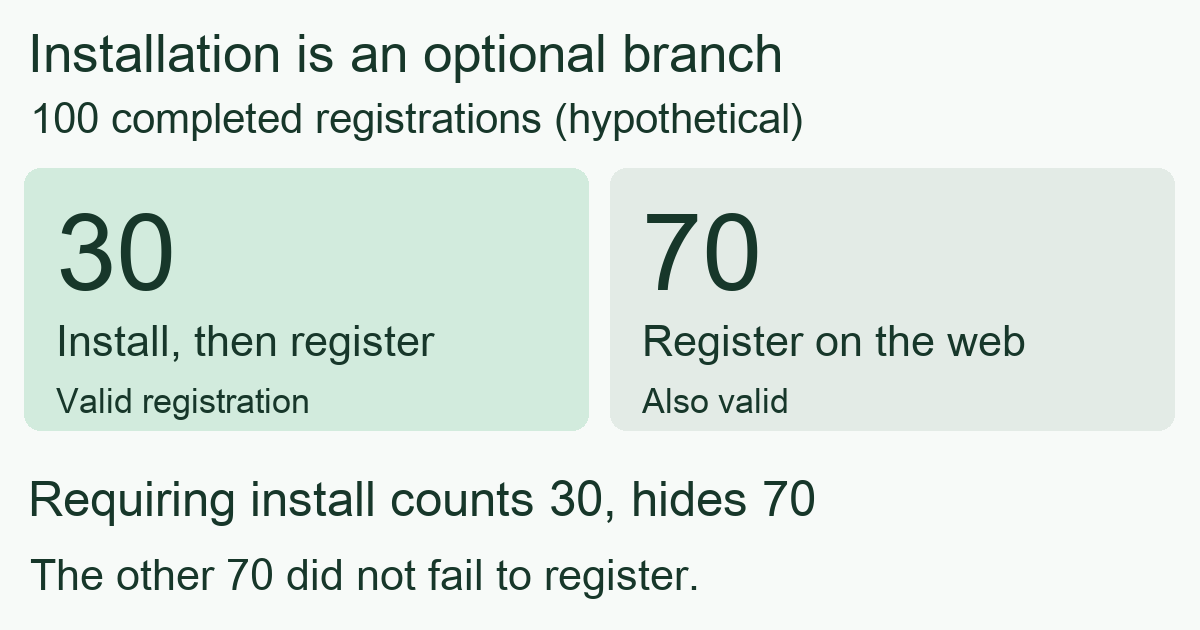
Keep the common business journey as the main funnel, then analyze installation and first open as a branch when relevant. Installation means adding the entry; first open means actually opening it for the first observed time. Neither establishes a completed payment. A customer can also install after registering, which is another reason to document order rather than forcing every event into one chain.
Open funnels answer a different question about people entering at different stages. Their stage totals cannot automatically be treated as one closed cohort. Label the report and preserve its settings when sharing a screenshot, so another person can reproduce the interpretation.
Separate true gaps from missing or immature observations
Before calling a gap abandonment, check whether the next step could actually be observed. Reconcile a small, privacy-safe sample of successful destination records with the measurement feed. Missing account-completion delivery, lost linkage across domains or inconsistent identifiers can make progress disappear from the report. Do not infer that no customers completed the action merely because the integration is disconnected.
Keep three outcomes separate: confirmed zero completions with working coverage; an unavailable completion count; and a cohort that still has time to finish. Follow the conversion-delay checkpoints before comparing a new cohort with a mature one. A zero denominator makes a percentage undefined, while an unobserved step makes the relevant comparison unavailable.
Segment only after those rules agree. Compare the same route, source and device group at the same observation age. An overall change can come from a different audience mix rather than a broken form; the registration-to-paying-customer example explains that distinction. A segment with two people is a lead for investigation, not a reliable winner.
Choose one step, one hypothesis and one follow-up
- Record the specification. Include campaign, entry dates, timezone, counted unit, identity coverage, required sequence, allowed intervening actions and observation window. Preserve optional paths separately.
- Check delivery first. Confirm that page arrival, form activity and business completion are available and consistently linked. Compare successful destination records; mark gaps in coverage explicitly.
- Inspect a real journey. If form starts look normal but account creation is weak, try the relevant mobile flow and examine validation or confirmation. If few people see the form, inspect the page's promise and next action instead.
- Test one explanation. A verified confusing field is a specific test candidate. Record a capped test and success measure before changing the page; avoid simultaneously changing audience, goal and creative.
- Review downstream results. Track completed accounts and paid customers at the same maturity, alongside the cost of the stated outcome. More easy intermediate actions alone do not establish a profitable improvement.
If the issue appears after arrival but before the form is seen, use the ad-to-page message-match audit to check the offer, eligibility, and action after the button. Find a concrete conflict; a funnel gap alone does not diagnose a copy problem.
If 20 additional account creations could retain the example's 20% payment rate, the arithmetic suggests four additional buyers. That is a planning scenario, not a forecast: the new registrants may differ and the payment rate may change. Use it to frame the question, then measure the actual result.
MeetROAS can help observe campaign-page and PWA stages alongside connected registration and deposit events. Its event reference distinguishes completed registrations and deposits as destination business outcomes. Downstream coverage requires valid delivery and linkage, and a deposit is not automatically a merchant purchase or profit. This does not imply automatic user-level reconstruction of the GA4 funnel or native tracking of every form field.
Sources
- Google Analytics: Funnel exploration — Checked: 2026-10-26
- Google Analytics: How to report on your lead generation form — Checked: 2026-10-26
- MeetROAS: Partner Event API reference — Checked: 2026-10-26